
Project Management
Project Management Mind Map Template
By RP Hobbyist · Updated
Most projects go through the same four phases: you get approval to start, plan the work, do it, and close it out. Seeing those phases on one map makes it easier to spot what nobody has thought about yet, like a budget without an owner or a handover that was never planned.
This template has a Project Lifecycle root with Initiation (Charter, Stakeholders), Planning (Scope, Schedule, Budget), Execution (Deliverables, QA) and Closure (Handover, Review). Add nodes under each phase as the project takes shape, and use status tags to mark what is done.
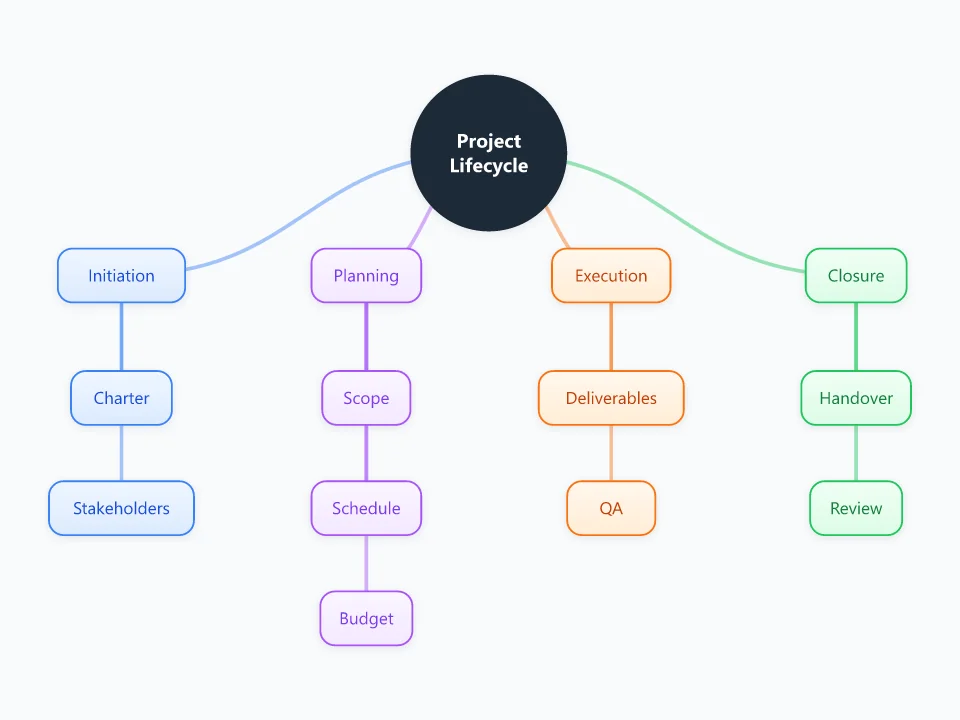
It opens as a new map with 14 topics already filled in. You don't need an account.
Open in the editorWhen to use a Project Management
- Kicking off a new project and agreeing on what it includes
- Outlining a project charter or plan before writing it up
- Explaining the shape of a project to a sponsor or a new team member
- Running a small project without a dedicated project management tool
What goes in each branch
- Initiation
- Write the charter in a sentence or two: the goal, the sponsor, and how you'll know it worked. Under Stakeholders, list everyone who can approve the project, block it, or is affected by it.
- Planning
- Scope lists what's in and, just as useful, what's out. Schedule holds the milestones with dates. Budget holds the main cost lines and who signs them off.
- Execution
- One node per deliverable, each with an owner. Under QA, note how each deliverable will be checked before it counts as done.
- Closure
- Handover covers who takes over the result and what they need from you, such as documents, access or training. Review is where you write down what to repeat and what to change next time.
Example: Moving a 40-person office to a new building
- Initiation: the charter says move by 30 June with no more than one day of downtime. Stakeholders are the office manager, IT, the landlord and every team lead.
- Planning: scope covers furniture, network and phones but not new hardware. The schedule has lease signing, network install and move weekend. The budget covers movers, cabling and a month of overlapping rent.
- Execution: the deliverables are the floor plan, the network install and the packed crates. QA is a test day where IT checks every desk.
- Closure: keys and the floor plan go to facilities, followed by a short review of what slowed the move down.
Tips
- Fill in Scope before Schedule. Dates set before the scope is agreed tend to slip.
- Give every deliverable one owner. A task with two owners usually ends up with none.
- Tag nodes as In Progress or Done, and filter by status in your weekly check-in.
- Keep the Review step even on small projects. Ten minutes of notes saves the next project from the same mistakes.
Using this template in Neuron Mapping
- Click Open in the editor. The template opens as a new map.
- Select a topic and press Tab to add a branch under it, or double-click a topic to change its text.
- Select a topic to change its color and shape, or add notes to it in Markdown.
- When you're done, export the map as a PDF or PNG, or save it to keep editing later.
Everything runs locally in your browser: your map is saved on your device, works offline, and can be exported as PDF, PNG or an editable .nmm file.