
Planning & Strategy
Eisenhower Matrix Mind Map Template
By RP Hobbyist · Updated
The Eisenhower Matrix, also called the Eisenhower Box or urgent-important matrix, is a prioritization method named after US President Dwight D. Eisenhower. Every task is judged on two questions, whether it is urgent and whether it is important, which places it in one of four quadrants: Do First, Schedule, Delegate or Eliminate.
This template gives you the four quadrants as branches, each labeled with its rule. Drop your to-do list into the map, move each task to the branch where it belongs, and you have a clear plan for the day or week.
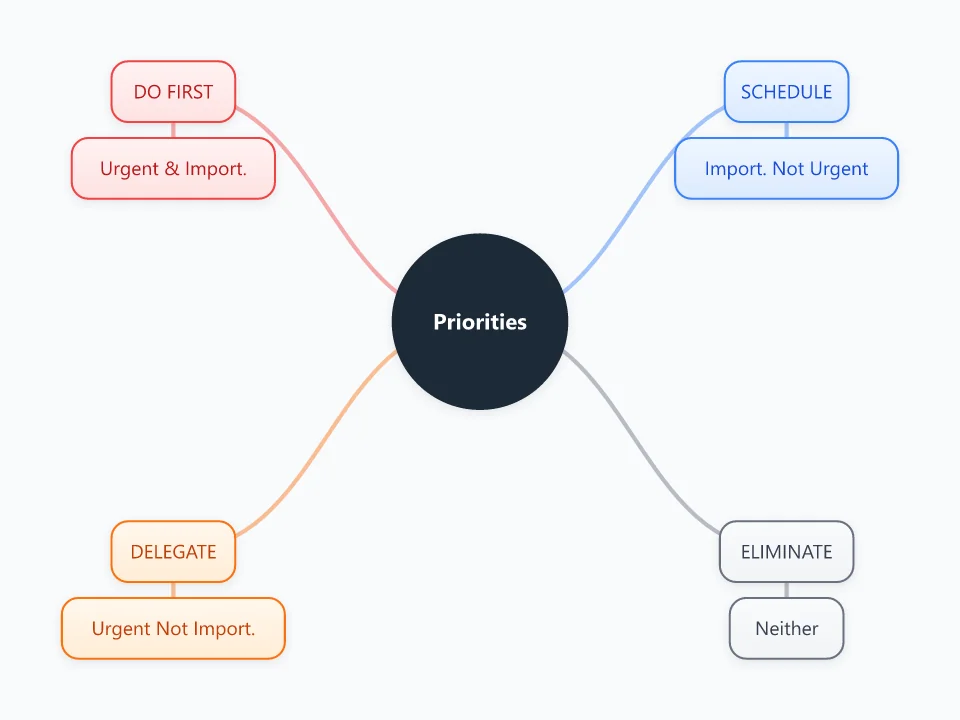
It opens as a new map with 9 topics already filled in. You don't need an account.
Open in the editorWhen to use a Eisenhower Box
- Your to-do list is longer than the time you have
- Planning a week or sprint and deciding what to drop
- Reviewing where your time actually goes
- Deciding which work to hand off to someone else
What goes in each branch
- Do First
- Urgent and important: deadlines today, real emergencies, problems that block others. Do these yourself, now.
- Schedule
- Important but not urgent: planning, learning, relationships, prevention. Put these on the calendar; this is where long-term progress happens.
- Delegate
- Urgent but not important to you: interruptions, many emails and meetings, routine requests. Hand them to someone else or batch them.
- Eliminate
- Neither urgent nor important: busywork and distractions. Delete them or consciously postpone them.
Example: A freelancer's Monday task list
- Do First: fix a client site outage; send the invoice due today
- Schedule: write a portfolio case study; learn a new CAD tool
- Delegate: format social media posts; book the courier pickup
- Eliminate: reorganize old folders; browse tool forums
Tips
- Judge importance by your goals, not by who is asking the loudest.
- If Do First keeps overflowing, move more work into Schedule so it gets done before it becomes urgent.
- Review the map at the end of each day and move unfinished tasks instead of letting them pile up.
- Add due dates or owners as child nodes under each task.
Using this template in Neuron Mapping
- Click Open in the editor. The template opens as a new map.
- Select a topic and press Tab to add a branch under it, or double-click a topic to change its text.
- Select a topic to change its color and shape, or add notes to it in Markdown.
- When you're done, export the map as a PDF or PNG, or save it to keep editing later.
Everything runs locally in your browser: your map is saved on your device, works offline, and can be exported as PDF, PNG or an editable .nmm file.