
Planning & Strategy
Customer Journey Map Template
By RP Hobbyist · Updated
A customer journey map shows the stages a person goes through with your product or service, from first hearing about it to recommending it to others. For each stage it captures the touchpoints where the customer interacts with you, and it can also record what they are trying to do, how they feel, and where they get stuck.
This template follows a five-stage model, Awareness, Consideration, Purchase, Retention and Advocacy, with example touchpoints under each stage. Replace them with your own channels and add pain points and ideas as child nodes to turn the map into an improvement plan.
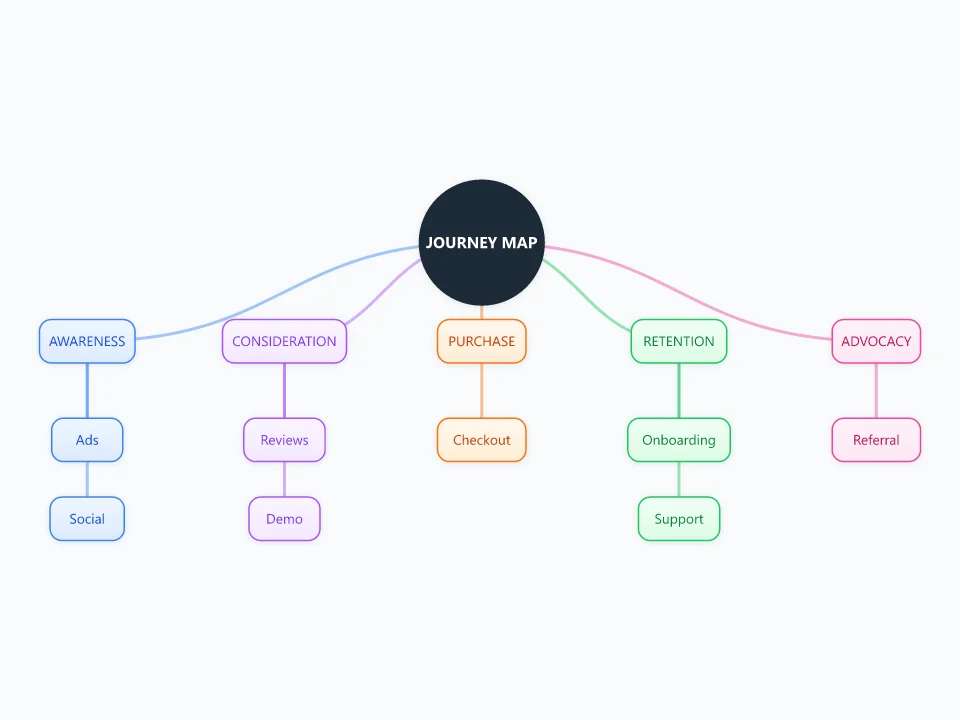
It opens as a new map with 14 topics already filled in. You don't need an account.
Open in the editorWhen to use a Customer Journey Map
- Finding where customers drop off or get frustrated
- Aligning marketing, sales, product and support around one view of the customer
- Designing a new service or onboarding flow
- Prioritizing customer experience improvements
What goes in each branch
- Awareness
- How people first discover you: ads, social media, search, word of mouth.
- Consideration
- How they compare you with alternatives: reviews, demos, comparisons, pricing pages.
- Purchase
- The moment they buy or sign up: checkout, contracts, payment, first delivery.
- Retention
- What keeps them using you: onboarding, support, updates, ongoing value.
- Advocacy
- What turns customers into promoters: referrals, reviews, community, case studies.
Example: An online shop selling custom 3D-printed parts
- Awareness: maker forums, YouTube build videos
- Consideration: sample photos, a material guide, an instant quote tool
- Purchase: file upload and checkout. Pain point: shipping cost is shown too late
- Retention: order tracking, a reorder button
- Advocacy: photo reviews, a referral discount
Tips
- Map the journey for one specific persona at a time; different customers take different routes.
- Base the map on real data such as interviews, analytics and support tickets rather than assumptions.
- Mark pain points in red and opportunities in green so the priorities stand out.
- Pair it with an empathy map to capture what the customer thinks and feels at each stage.
Using this template in Neuron Mapping
- Click Open in the editor. The template opens as a new map.
- Select a topic and press Tab to add a branch under it, or double-click a topic to change its text.
- Select a topic to change its color and shape, or add notes to it in Markdown.
- When you're done, export the map as a PDF or PNG, or save it to keep editing later.
Everything runs locally in your browser: your map is saved on your device, works offline, and can be exported as PDF, PNG or an editable .nmm file.