
Business
Business Analyst Mind Map Template
By RP Hobbyist · Updated
A business analyst's job is to understand how an organization works today and what has to change, then turn that into requirements a team can build from. That means keeping a lot of threads in view at once: processes, rules, requirements, and the people and tools involved.
This template puts BUSINESS ANALYST at the center with four branches: PROCESSES (Workflows, Analysis), RULES (Compliance, Policies), REQUIREMENTS (Functional, Non-Func) and RESOURCES (Team, Tools). Use it as a one-page overview of a project, or as a checklist so nothing gets missed during discovery.
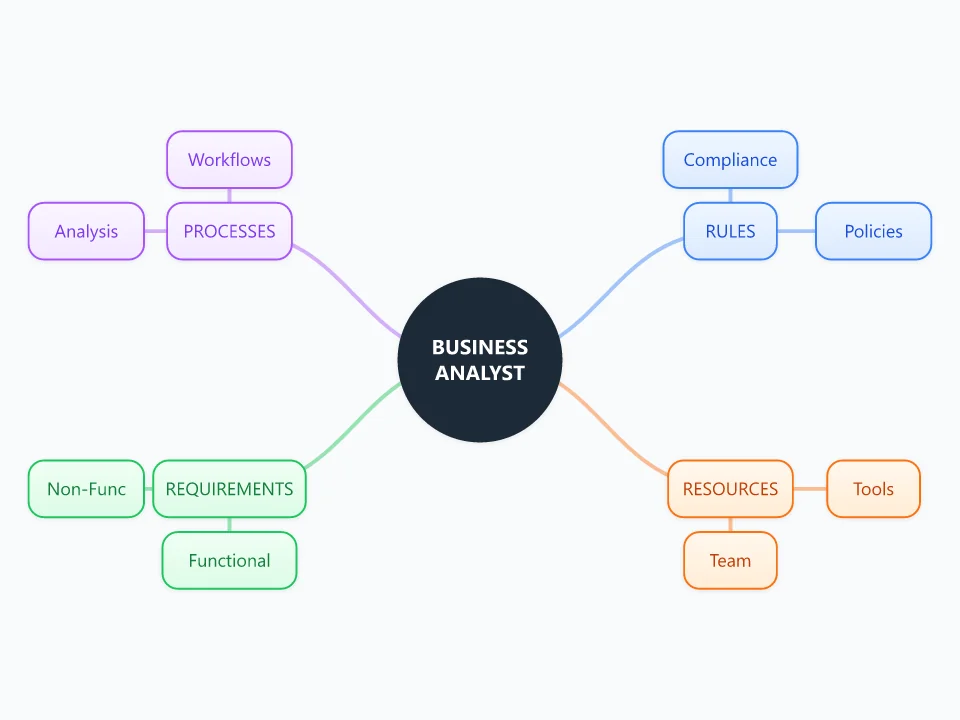
It opens as a new map with 13 topics already filled in. You don't need an account.
Open in the editorWhen to use a Business Analyst
- Starting discovery on a new project or system change
- Preparing for stakeholder workshops or interviews
- Sorting requirements before writing a specification
- Joining a project that someone else started
What goes in each branch
- PROCESSES
- Workflows describe how the work happens now, step by step. Analysis is where you note problems, delays and what the future process should look like.
- RULES
- Compliance covers the laws and regulations the solution has to follow. Policies are internal rules, such as approval limits or how long data is kept.
- REQUIREMENTS
- Functional requirements describe what the system must do. Non-functional ones describe how well it must do it: speed, security, availability, accessibility.
- RESOURCES
- Team lists the stakeholders and who decides what. Tools lists the existing systems the change has to work with.
Example: Replacing a paper expense claim process with an app
- Processes: claims are filled in by hand, signed by a manager, then typed in again by finance. An average claim takes 12 days.
- Rules: receipts must be kept for six years, and claims over $500 need a director's approval.
- Requirements: staff can photograph receipts in the app (functional), and the app works offline on phones (non-functional).
- Resources: finance, two pilot teams and IT. The app has to connect to the existing accounting system.
Tips
- Ask why a step exists before you write it down. Some "rules" turn out to be habits.
- Note where each requirement came from, so you know who to ask when it's unclear.
- Use colors to mark requirements as must have, should have or could have.
- Keep interview notes in node notes instead of adding more nodes, so the map stays readable.
Using this template in Neuron Mapping
- Click Open in the editor. The template opens as a new map.
- Select a topic and press Tab to add a branch under it, or double-click a topic to change its text.
- Select a topic to change its color and shape, or add notes to it in Markdown.
- When you're done, export the map as a PDF or PNG, or save it to keep editing later.
Everything runs locally in your browser: your map is saved on your device, works offline, and can be exported as PDF, PNG or an editable .nmm file.