
Version 1.7 is out, with text formatting, box areas and node status.
Free online mind map maker
Make sense of your ideas.
Neuron Mapping is a mind mapping tool that runs in your browser. Pick one of 33 templates or start from scratch, and export to PDF or PNG when you're done. There's no account to create, nothing to pay, and your maps are saved on your own device.
Free and open source under the AGPLv3. The desktop app runs on Windows, macOS and Linux.
Start from a template
Pick one of 30+ templates, like this product launch plan, or import a Markdown, OPML or CSV outline.
What's new in version 1.7
Most of this release went into the editor. Here's what changed.
- Text formatting
- Bold, italic, underline and strikethrough inside nodes, plus fonts, sizes, headings and lists.
- Box areas
- Draw a labelled box around a group of nodes. When you drag the box, the nodes inside go with it.
- Node status
- Mark a node as Backlog, Planning, In Progress, Review, Blocked or Done. Search can filter by status.
- Custom colors
- A proper color picker, with an eyedropper in Chrome and Edge. It remembers your last 8 colors.
- Arrowheads
- Put arrows on the start, the end or both ends of a line, pointing whichever way you need.
- Resume unsaved work
- If you close the tab before saving, the start page offers to bring your last session back.
- Snapshots per map
- Each map has its own snapshot history. Restoring an old one saves a backup of the current version first.
All of it is in the web app now. Try it in the editor
Mind mapping features
The basics take a minute to pick up, and there's more to find when your maps get bigger.
Keyboard-friendly canvas
Tab adds a child node, Space edits it, and the arrow keys move between nodes. You can build a whole map without touching the mouse.
Formatting and notes
Format the text inside each node, and attach longer notes written in Markdown when a few words aren't enough.
Room for big maps
Group nodes in box areas, give them a status, and use the search filters to find things again. Focus Mode hides everything except the branch you're working on.
Import what you already have
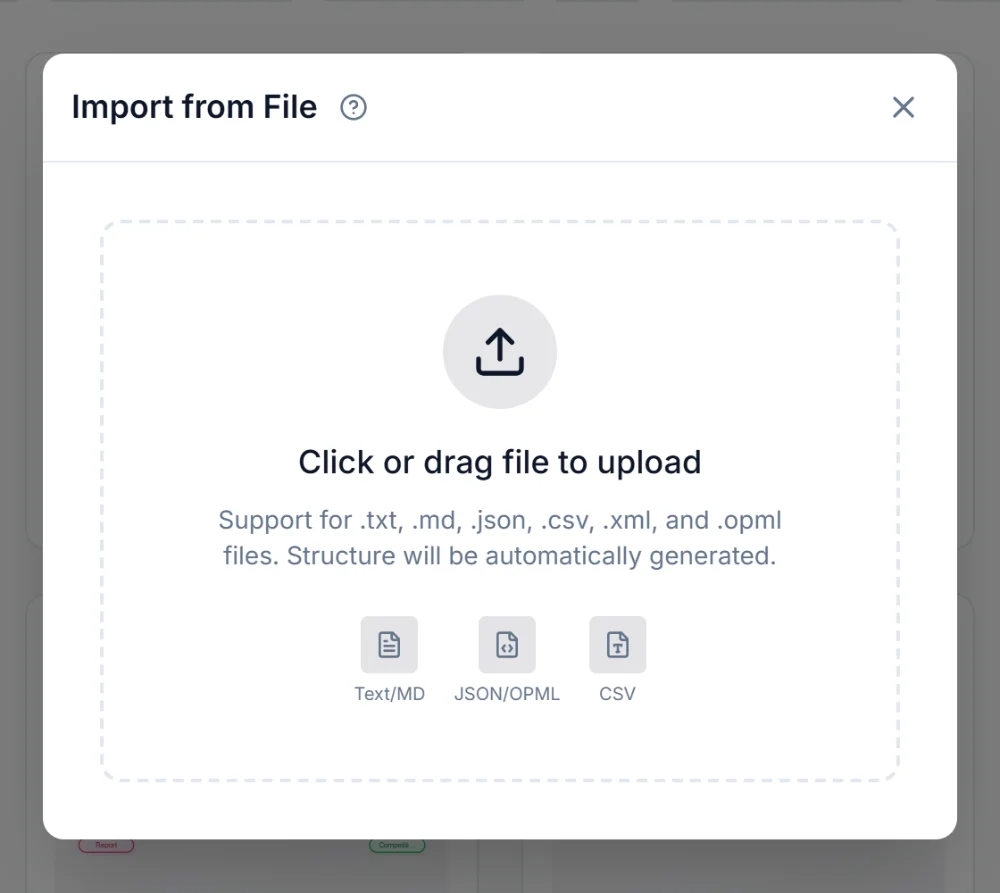
Open a Markdown outline, CSV, OPML, JSON, XML or text file and it becomes a mind map. OPML is the easy way to move maps over from other apps.
Export and share
Save a PDF or PNG for slides and reports, or a .nmm file so you can keep editing later.
3D Galaxy View
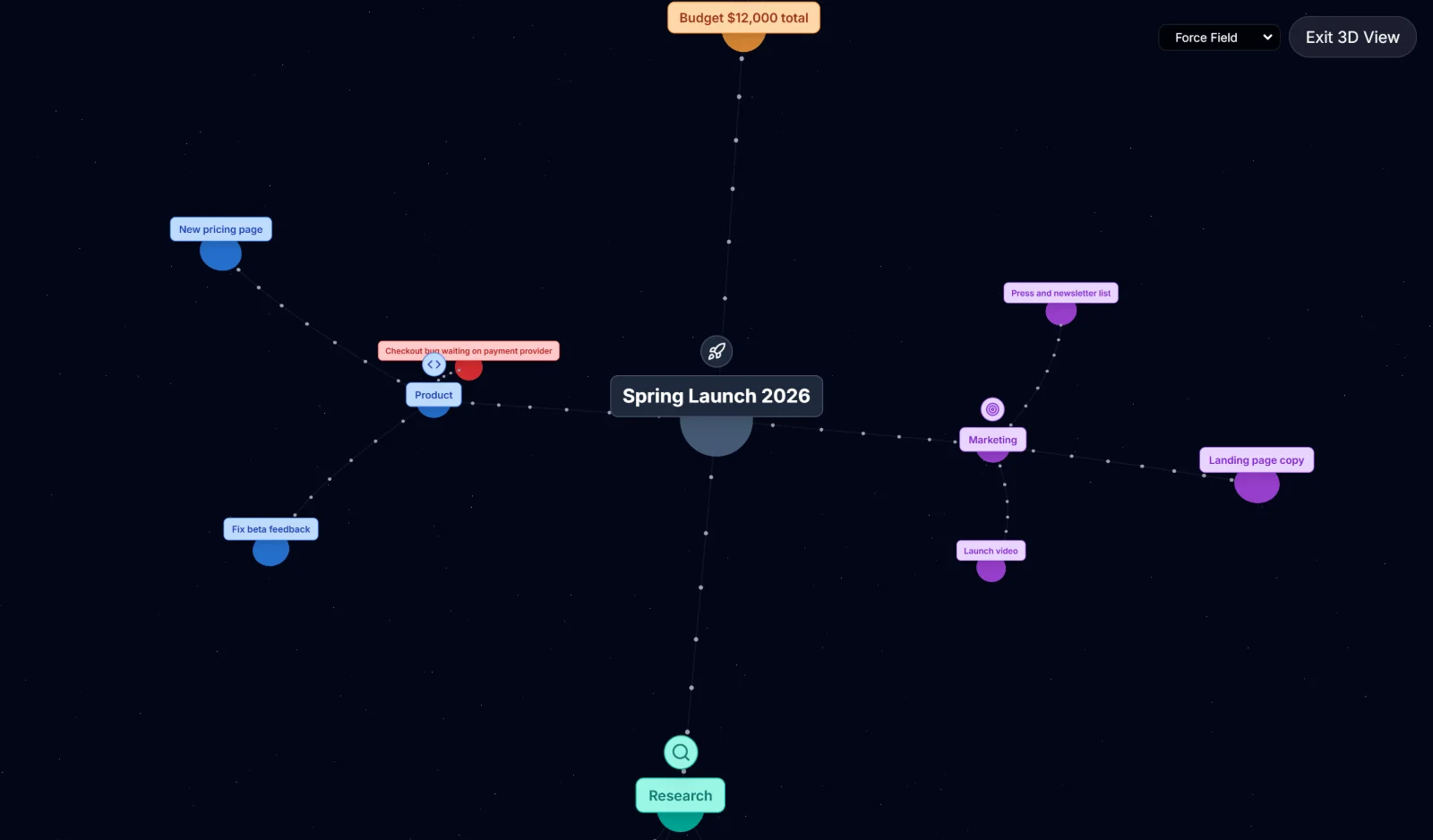
Switch to 3D to see the whole map at once, with Sphere, Grid, Force and 2D Projection layouts. Useful for spotting clusters in large maps.
Play Mode
Reveals a map one node at a time, which works well for lessons, pitches and team walkthroughs.
Private by default
Maps are saved in your browser, on your own device. There's no account, and nothing you write gets uploaded.
33 free templates
SWOT analysis, Business Model Canvas, Kanban board, decision tree, customer journey map and more. Every one of them is editable. See all templates
A closer look at the mind map editor
These are real screenshots, all from the same launch plan, so you know what you're getting before you open it.
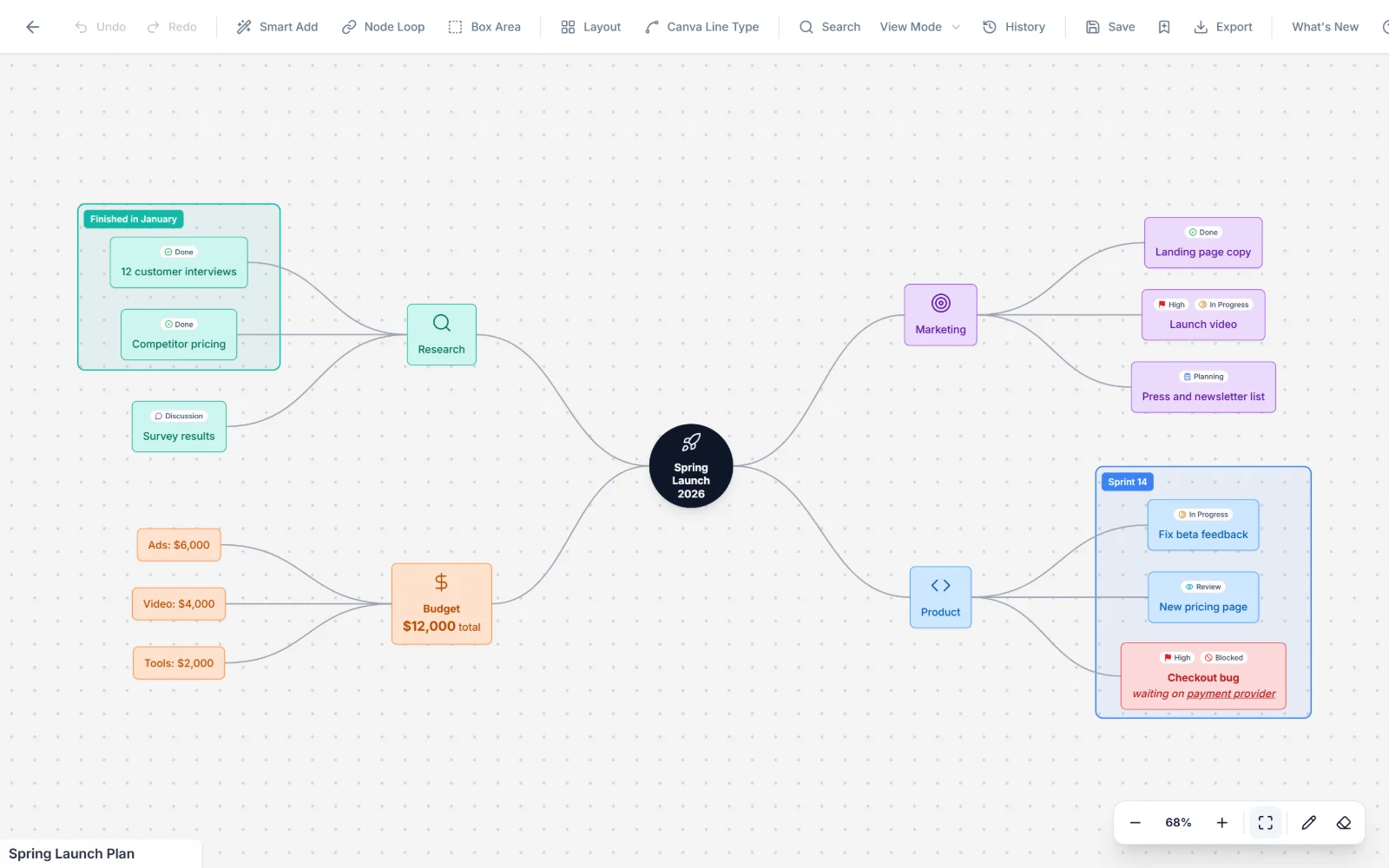
One map for the whole plan
This is a real launch plan made in Neuron Mapping. Research, budget, marketing and product work all sit on one canvas, so you can see how everything connects.
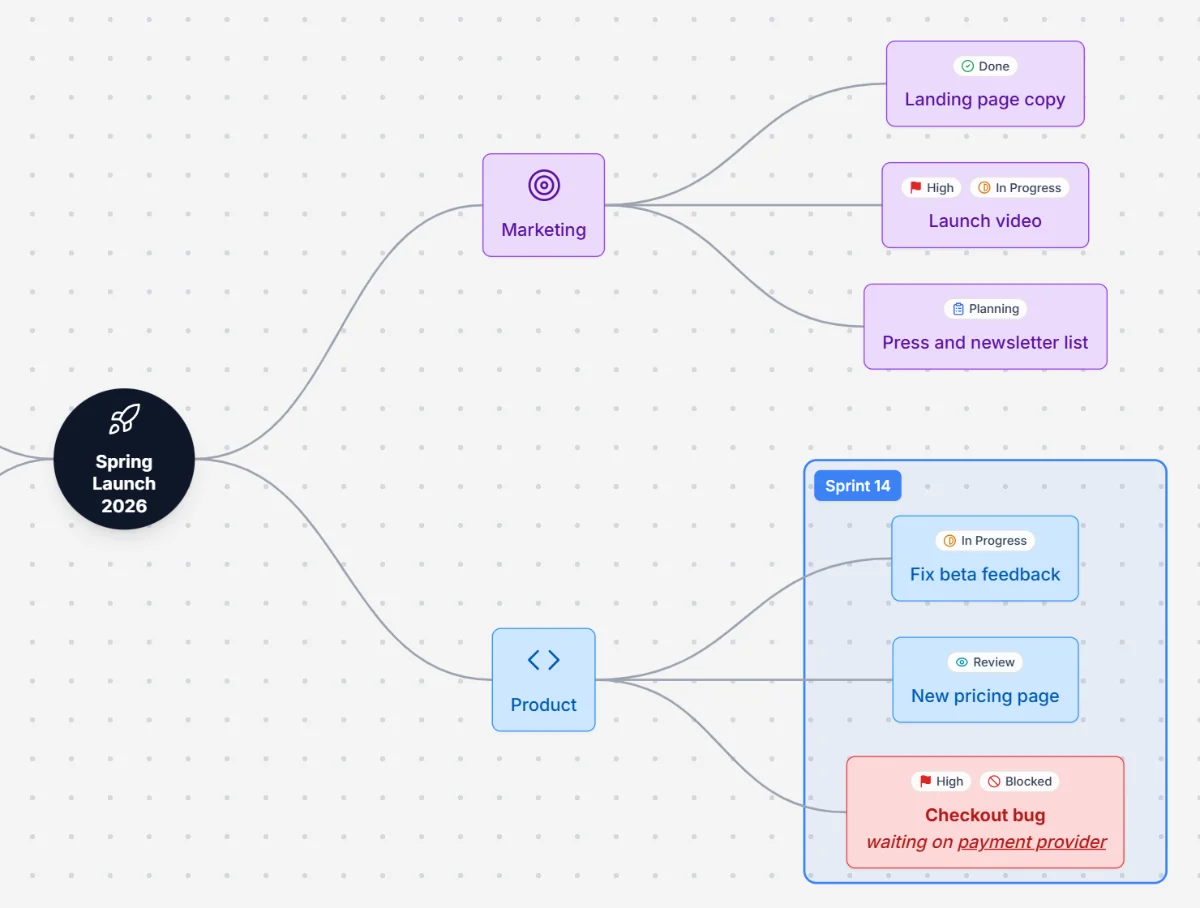
Track progress on the map itself
Tag each task with a status and a priority, and draw a box around the ones that belong together. Here the Sprint 14 box holds this sprint's work, and the blocked checkout bug stands out in red.
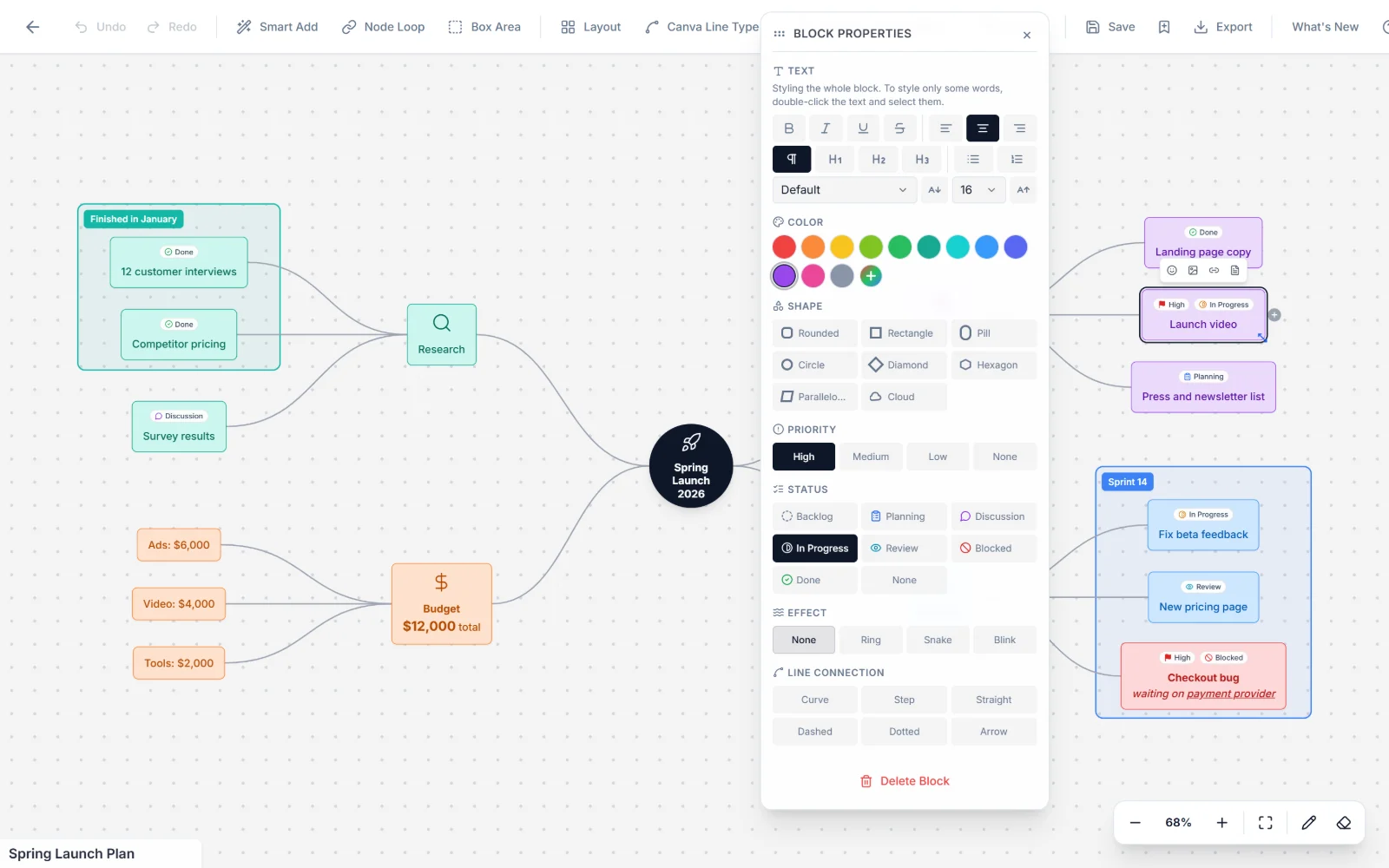
Style a node in a couple of clicks
Select a node and everything you can change is in one panel: text formatting, color, shape, priority, status and the line that connects it.
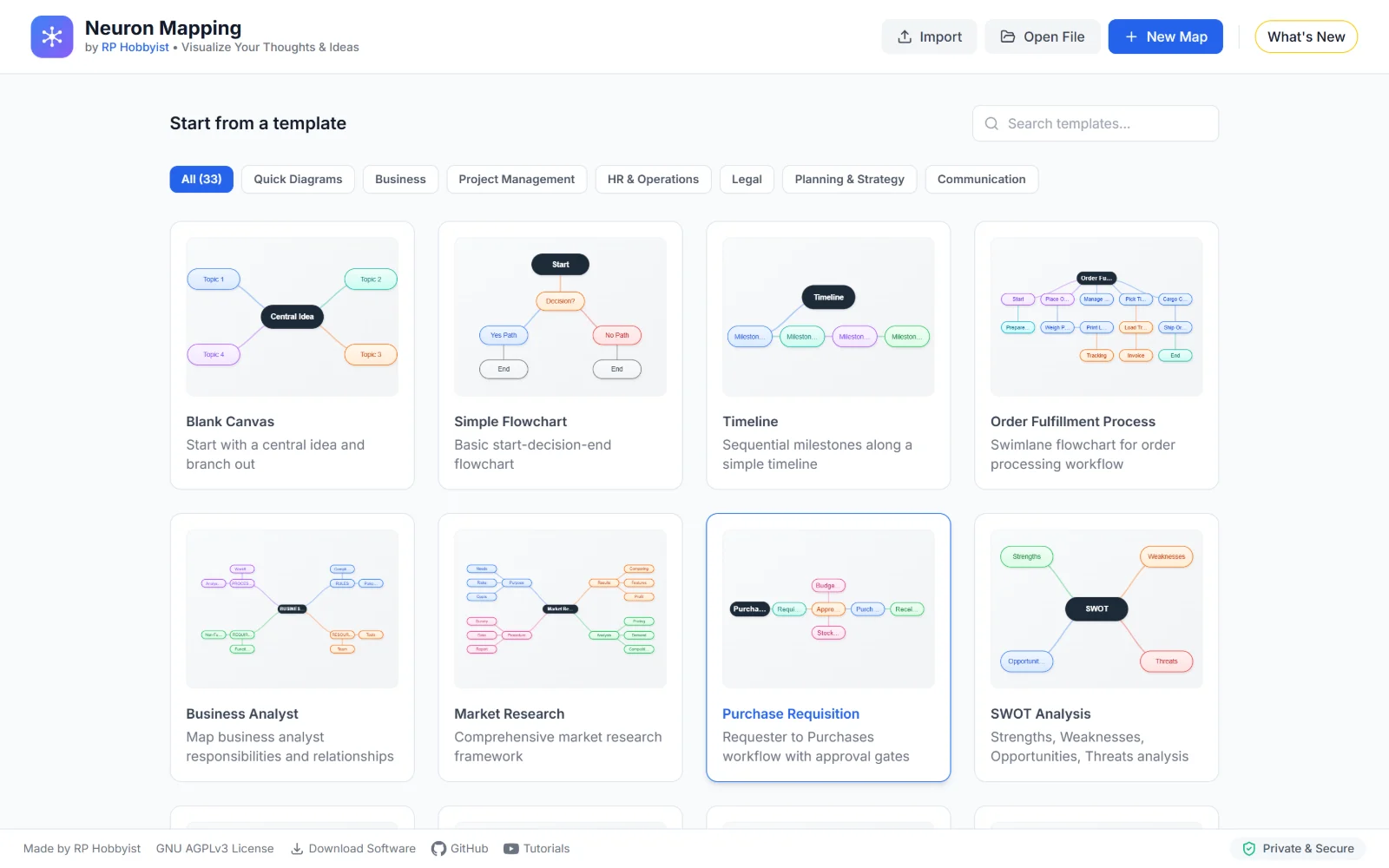
Start from a template
Pick from 33 templates sorted by category, from a blank canvas and simple flowcharts to SWOT analysis and purchase requisition workflows.
Bring in notes you already have
Drop a Markdown outline, CSV, OPML, JSON, XML or text file into the import window and the branches are built for you.
Step back and see it in 3D
The 3D Galaxy View lays the same map out in space. You can rotate it, zoom in, and switch between Force Field, Sphere, Grid and 2D Projection layouts.
How to make a mind map
No signup and no download. Open the editor and start typing.
- 1
Pick a starting point
Choose a template, import a file, or start with a blank canvas.
- 2
Add your ideas
Type the main idea, press Tab to branch out, and double-click any node to edit it.
- 3
Export or save
Download a PDF or PNG, or save a .nmm file so you can pick it up later.
Mind maps for school, work and planning
A few good places to start, depending on what you're working on.
Students and teachers
Turn a chapter into a study map, outline an essay before writing it, or plan a lesson.
Project managers
Break a project into tasks, track where each one stands, and keep a launch on schedule.
Founders and strategists
Test a business idea, look at the competition, and get the whole plan onto one page.
Problem solving
Find the root cause of a problem, compare your options, and write down why you chose one.
Popular mind map templates
Each one comes with a short guide on how to use it, and opens in the editor with one click.
SWOT Analysis Template
Strengths, Weaknesses, Opportunities, Threats analysis
Business Model Canvas Template
Nine building blocks for designing or documenting a business model
Eisenhower Matrix Template
Prioritize tasks: Do First, Schedule, Delegate, Eliminate
Fishbone Diagram Template
Trace causes to key problems and symptoms
5 Whys Root Cause Analysis Template
Drill from a problem to its root cause by asking "why" five times
Decision Tree Template
Map a decision and its branching yes/no outcomes
OKR Template
Objectives, Key Results, and supporting initiatives
Customer Journey Map Template
Awareness to Advocacy customer touchpoints
Empathy Map Template
Understand a user through what they say, think, do, and feel
Porter's Five Forces Template
Industry competitive analysis framework
Org Chart Template
Company reporting hierarchy from leadership to teams
Sprint Retrospective Template
Start, Stop, Continue format for agile sprint retros
Compliance Review Checklist Template
Audit data privacy, contracts, regulatory and employment compliance
Kanban Board Template
To Do, In Progress, Done task board
Blank Mind Map Template
Start with a central idea and branch out
Flowchart Template
Basic start-decision-end flowchart
Timeline Template
Sequential milestones along a simple timeline
Venn Diagram Template
Compare and contrast elements
Six Thinking Hats Template
Explore problems from multiple perspectives
Employee Onboarding Template
HR, IT, Manager, Day 1 Training swimlane workflow
Product Launch Checklist Template
Complete checklist for product launches
Project Management Template
Project lifecycle from initiation to closure
Market Research Template
Comprehensive market research framework
Argument Map Template
Structure arguments with reasons, evidence and objections
PDCA Cycle Diagram Template
Plan-Do-Check-Act-Review continuous improvement cycle
Supplier Evaluation Template
Evaluate suppliers with requirements and monitoring
Product Development Template
End-to-end product development with all phases
Legal Case Process Template
Legal case workflow with decision points
Business Analyst Template
Map business analyst responsibilities and relationships
Order Fulfillment Process Template
Swimlane flowchart for order processing workflow
Purchase Requisition Template
Requester to Purchases workflow with approval gates
Technology Stack Diagram Template
Visualizing technology stack or architectural layers
Watch the video walkthrough
A full tour of the editor on YouTube.
How it compares
Neuron Mapping next to online whiteboards and paid mind map apps.
| Feature | Online whiteboards | Paid mind map apps | Neuron Mapping |
|---|---|---|---|
| Infinite canvas | |||
| No signup needed | |||
| 33 planning templates | Partly | ||
| Text formatting inside nodes | Partly | ||
| Import Markdown, CSV and OPML | Partly | ||
| 3D Galaxy View | |||
| Works offline (desktop app) | Partly | ||
| Keyboard shortcuts for everything | Partly | ||
| Maps stay on your device | |||
| Open source | |||
| Price | Free-ish | $8–15/mo | Free |
Your maps stay on your device
Neuron Mapping saves everything in your browser's own storage. There's no account and no cookies, and your maps are never sent to a server. Opening files and exporting them happens on your computer too.
The code is open source, so you don't have to take our word for it. Read it on GitHub
From the blog
Articles on mind mapping, making things and the tools behind them.
Ready to try it?
Open the editor, type your main idea and press Tab. That's all it takes to get going.
Frequently asked questions
Something not covered here? Ask on GitHub.