
Business
Order Fulfillment Process Template
By RP Hobbyist · Updated
Order fulfillment is everything between a customer paying and the parcel arriving: checking stock, picking items, packing, labelling, shipping and invoicing. When orders go missing or ship late, the cause is usually a handoff between two of those steps that nobody owns.
This template is laid out like a swimlane flowchart. From the Order Fulfillment root it runs through Place Order, Manage Stock, Pick Ticket and Cargo Coord, with steps such as Weigh Pkg, Print Labels, Tracking, Load Trucks, Invoice and Ship Order along the way. Rename the lanes to match the teams or systems in your own operation.
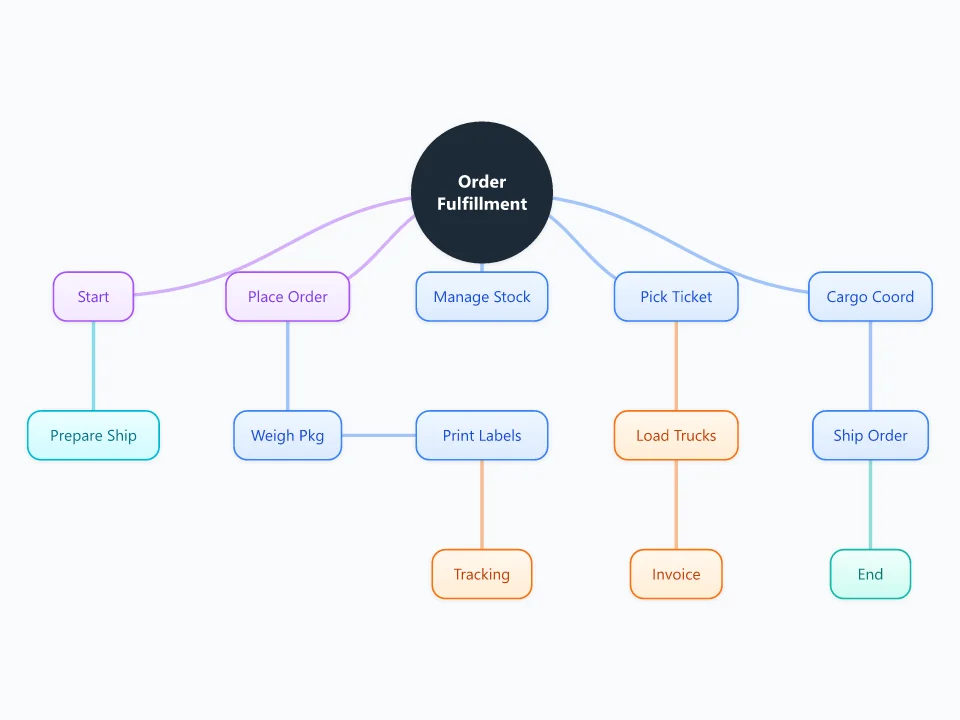
It opens as a new map with 14 topics already filled in. You don't need an account.
Open in the editorWhen to use a Order Fulfillment Process
- Writing down how orders move through a warehouse or a small shop
- Finding the step that causes late or wrong shipments
- Training new warehouse or customer service staff
- Planning a move to a new courier or e-commerce platform
What goes in each branch
- Place Order
- How orders come in: website, marketplace, phone or email. Then the packing steps: weighing the parcel, printing labels and sending tracking details to the customer.
- Manage Stock
- How stock is checked and reserved when an order arrives, and what happens when an item is out of stock.
- Pick Ticket
- The list warehouse staff use to pick the items, followed by loading and invoicing.
- Cargo Coord and Ship Order
- Booking couriers or freight, handing over the parcels, and confirming that the order has shipped.
Example: An online plant shop shipping 150 orders a day
- Orders come from the website and one marketplace, and both feed a single order list.
- Stock is checked automatically, but any plant that looks unhealthy on the day gets swapped by hand.
- Pick tickets print at 9 am and 1 pm. Anything ordered after 1 pm ships the next day.
- Labels and tracking emails come from the courier's app, and the courier collects at 4 pm.
- Mapping it showed that invoices only went out after shipping, which confused customers whose orders were split.
Tips
- Map the process as it really runs today, not as it's supposed to run. The gaps are what you're looking for.
- Mark each step with the person or system responsible for it.
- Add cut-off times to the nodes. Missed cut-offs are a common cause of late orders.
- Color the steps where mistakes happen most often, and start fixing there.
Using this template in Neuron Mapping
- Click Open in the editor. The template opens as a new map.
- Select a topic and press Tab to add a branch under it, or double-click a topic to change its text.
- Select a topic to change its color and shape, or add notes to it in Markdown.
- When you're done, export the map as a PDF or PNG, or save it to keep editing later.
Everything runs locally in your browser: your map is saved on your device, works offline, and can be exported as PDF, PNG or an editable .nmm file.