
Project Management
Product Launch Checklist Template
By RP Hobbyist · Updated
A product launch involves many people finishing different tasks by the same date. A checklist keeps them all in one place, so legal requirements are covered, the website is ready, marketing goes out on time, and support can answer customers from day one.
This template groups launch work into four areas, Legal, Landing Pages, Marketing and Support, with three checkpoints under each. Add the tasks that apply to your product, mark each one as it is done, and use the map as the single source of truth in launch meetings.
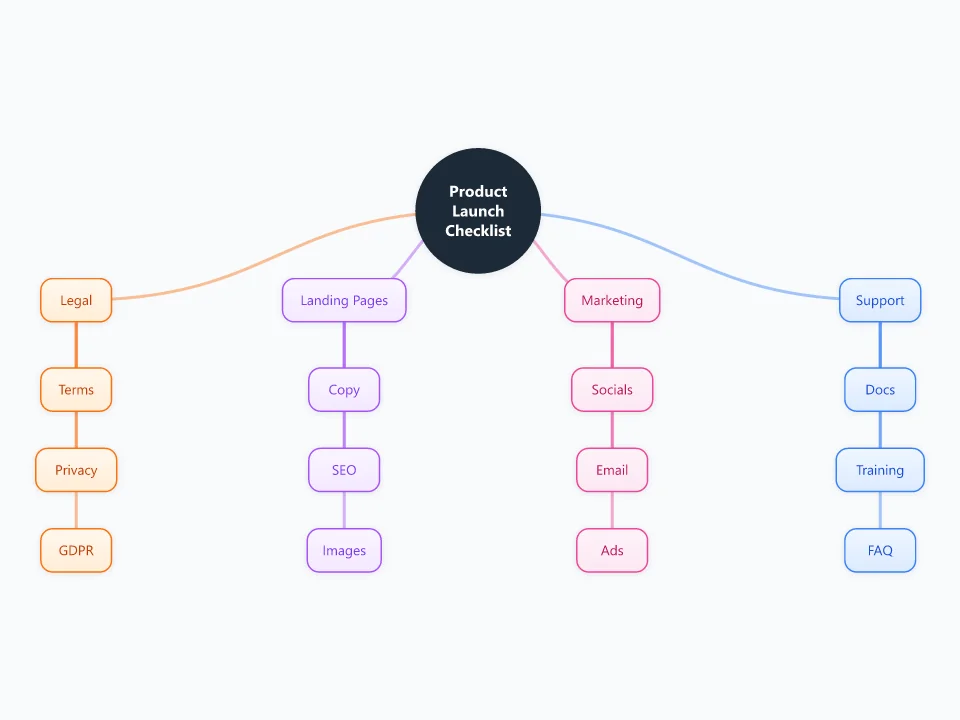
It opens as a new map with 17 topics already filled in. You don't need an account.
Open in the editorWhen to use a Product Launch Checklist
- Launching a new product, app or feature
- Opening an online store or releasing a new product line
- Coordinating a launch across marketing, legal and support
- Reviewing launch readiness in a go/no-go meeting
What goes in each branch
- Legal
- Terms of service, the privacy policy and data-protection requirements such as GDPR, plus any licences, trademarks or product labeling.
- Landing Pages
- The pages people will see: clear copy, SEO basics (titles, descriptions, indexable pages), images, and a working sign-up or checkout.
- Marketing
- Announcements on social media and by email, paid ads, and press or community posts, all scheduled for launch day.
- Support
- Help docs, team training and an FAQ, so customers get answers quickly when the first questions arrive.
Example: Launching a mobile budgeting app
- Legal: privacy policy covers bank data; GDPR consent screens tested
- Landing Pages: app store listing and website copy approved; screenshots updated
- Marketing: launch email scheduled; social posts queued; small ad budget ready
- Support: help center articles live; team trained on the ten most likely questions
Tips
- Give every item an owner and a due date, working backwards from launch day.
- Mark blockers in red and review them daily in the final week.
- Hold a go/no-go review a few days before launch using this map.
- After launch, add a Post-launch branch for monitoring, feedback and fixes.
Using this template in Neuron Mapping
- Click Open in the editor. The template opens as a new map.
- Select a topic and press Tab to add a branch under it, or double-click a topic to change its text.
- Select a topic to change its color and shape, or add notes to it in Markdown.
- When you're done, export the map as a PDF or PNG, or save it to keep editing later.
Everything runs locally in your browser: your map is saved on your device, works offline, and can be exported as PDF, PNG or an editable .nmm file.