
Legal
Legal Case Workflow Template
By RP Hobbyist · Updated
Every legal matter follows a path with a few big forks: whether the facts support a claim, whether the other side disputes it, and whether it settles or goes to trial. A workflow map shows that path for one case, so the client, the lawyer handling it and anyone covering for them can see where things stand.
This template is a top-to-bottom flow: Instructions, Background Check, Review Case, Documentation, then a Dispute? decision that splits into Settle (then Close) and Proceeding (then Trial). It's a general outline, not legal advice, so adjust the steps to your jurisdiction and area of practice.
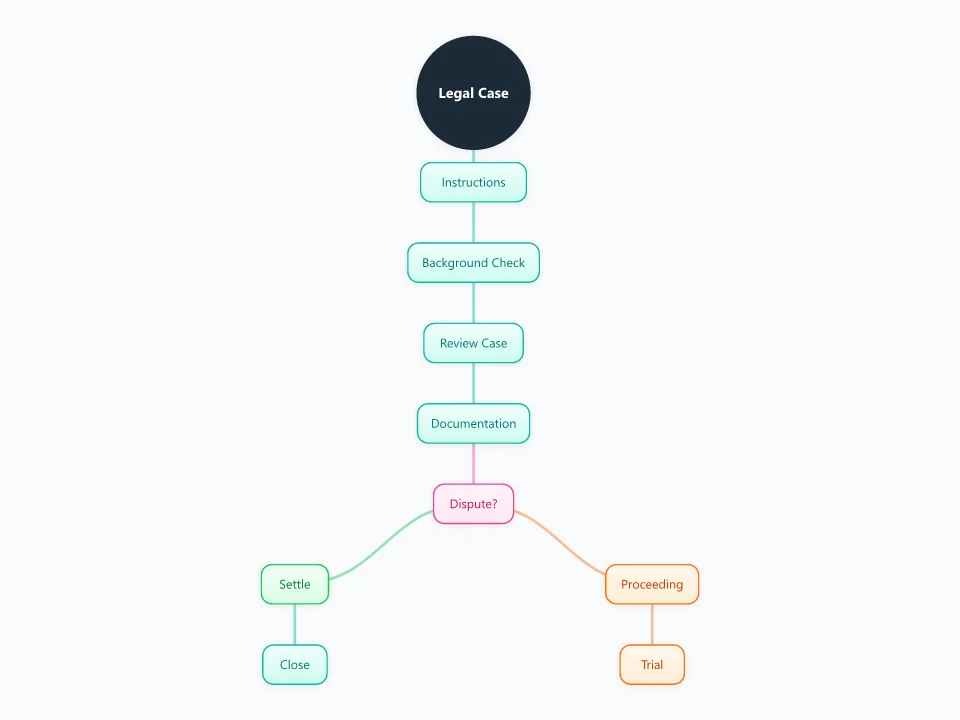
It opens as a new map with 10 topics already filled in. You don't need an account.
Open in the editorWhen to use a Legal Case Process
- Opening a new matter and agreeing next steps with the client
- Handing a file over to a colleague
- Explaining to a client how their case is likely to go
- Training paralegals or junior staff on the firm's usual process
What goes in each branch
- Instructions
- What the client wants, the key dates and the agreed scope of work. Put any hard deadline, such as a limitation period, right here at the top.
- Background Check and Review Case
- Conflict and identity checks, then a first look at the facts and the law. This is where you decide whether the matter is worth taking further.
- Documentation
- Contracts, correspondence, evidence and witness details. Use node notes to record where each document is kept.
- Dispute? then Settle or Proceeding
- If the other side accepts the claim or an offer is agreed, the matter settles and closes. If not, it moves to proceedings and possibly a trial.
Example: A small business chasing an unpaid $18,000 invoice
- Instructions: recover the debt. The invoice is four months overdue.
- Background check: no conflict, and the debtor company is still trading.
- Review and documentation: a signed contract, delivery notes and three reminder emails.
- Dispute?: the debtor says the work was late and offers $12,000.
- Outcome: after some back and forth the client accepts $15,000, and the matter is closed.
Tips
- Put the most important deadline in red on the first node so nobody can miss it.
- Add a child node under each step with the date it was finished.
- Record every settlement offer with its date. In some courts, offers affect who pays costs later.
- Save a version of the map as a template for each area you handle, such as employment or debt recovery.
Using this template in Neuron Mapping
- Click Open in the editor. The template opens as a new map.
- Select a topic and press Tab to add a branch under it, or double-click a topic to change its text.
- Select a topic to change its color and shape, or add notes to it in Markdown.
- When you're done, export the map as a PDF or PNG, or save it to keep editing later.
Everything runs locally in your browser: your map is saved on your device, works offline, and can be exported as PDF, PNG or an editable .nmm file.